Frida: Inspecting Android TLS Checks and Native Applications
How I use Frida to inspect Android TLS behaviour, distinguish UI changes from real bypasses, and trace selected Windows API calls.
Contents
- Why I use Frida
- Install and setup
- Build a baseline that can fail for the right reason
- Configure Burp and check certificate trust
- First experiment: change the display only
- Second experiment: inspect the pinning boundary
- What counts as a successful result
- Tips and gotchas
- Trace a Windows application
- What I keep in the assessment notes
Why I use Frida
I use Frida when I need to understand what an application does while it is running. I can observe a function call, inspect its arguments, and change behavior for a controlled test. That is useful when static code alone does not explain the result I see.
My original demonstration used an Android application with OkHttp certificate pinning. I first changed a message on screen, then changed the checks that stopped an HTTPS connection through Burp. Those two experiments showed different things. Changing a success message does not make a failed connection succeed.
I also used Frida with Windows applications to inspect selected registry and network calls. The same approach carries across platforms, although the APIs and permissions differ.
Authorized testing only
Only run this against systems you own or have written permission to test.
Install and setup
For the Android example, I need:
- A disposable rooted Android test device or an emulator that allows root access.
- ADB on the workstation and an authorized device connection.
- Frida tools on the workstation and a matching Frida server for Android.
- My test APK, its package name, and the OkHttp version it includes.
- Burp Suite with a listener reachable from the device.
- A controlled HTTPS endpoint and valid pin for the application's baseline test.
I install the workstation tools in a Python virtual environment:
python3 -m venv .venv
source .venv/bin/activate
python -m pip install frida-tools
frida --version
adb devices
adb shell getprop ro.product.cpu.abilist
The server must match the Frida core version, not the separate frida-tools package version. I also match the server architecture to the Android device. An ARM64 device needs a different binary from an x86 emulator.
The Frida Android guide documents the server setup. I download the matching asset from the official releases, decompress it, and rename the local file to frida-server before continuing:
adb push frida-server /data/local/tmp/frida-server
adb shell chmod 755 /data/local/tmp/frida-server
On an emulator that supports root ADB, I can start it this way:
adb root
adb shell '/data/local/tmp/frida-server > /data/local/tmp/frida-server.log 2>&1 &'
frida-ps -U
If adb root is unavailable, I use the rooted device's supported root mechanism to start the server. Making the file executable does not grant root. I check enumeration before debugging a hook script.
Build a baseline that can fail for the right reason
My application creates an OkHttp client with a CertificatePinner and sends an HTTPS request when I press a button. Pinning adds a check on the server's public key. It sits alongside ordinary certificate-chain and hostname verification.
The code below is a method to adapt inside an Android activity. It expects a real hostname, an actual sha256/ pin for that endpoint, and an existing status view. It is not a complete Android project.
private void requestPinned(
        String hostname,
        String pin,
        android.widget.TextView status) {
    new Thread(() -> {
        okhttp3.CertificatePinner pinner =
            new okhttp3.CertificatePinner.Builder()
                .add(hostname, pin)
                .build();

        okhttp3.OkHttpClient client =
            new okhttp3.OkHttpClient.Builder()
                .certificatePinner(pinner)
                .build();

        okhttp3.Request request = new okhttp3.Request.Builder()
            .url("https://" + hostname + "/")
            .build();

        try (okhttp3.Response response =
                client.newCall(request).execute()) {
            String message = "Connection completed: HTTP " + response.code();
            runOnUiThread(() -> status.setText(message));
        } catch (java.io.IOException error) {
            android.util.Log.e("PinningLab", "Request failed", error);
            runOnUiThread(() -> status.setText("Connection failed"));
        }
    }).start();
}
This fixes two problems in my earlier sample: it closes the response and sends view updates back to the UI thread. I also avoid reusing old pins for a third-party site. Certificate rotation can make those values fail before Burp or Frida enters the picture.
I first confirm that the request succeeds directly. Then I route it through Burp and identify the failure. Without those two observations, I cannot tell whether I am testing pinning, an unreachable proxy, or a broken endpoint.
Configure Burp and check certificate trust
I start a Burp proxy listener on an interface the device can reach. In current Burp interfaces, listener configuration is under Proxy settings; older screenshots use an Options tab.
On Android, I configure the Wi-Fi connection's manual proxy with the workstation address and listener port. The workstation address must be reachable from the device. 127.0.0.1 on the device refers to the device itself.
I then check the app's trust configuration. Installing Burp's CA in the user certificate store does not make every Android app trust it. Android's behavior depends on the app's target level and Network Security Configuration.
For an application I build myself, I prefer a debug configuration that trusts the test CA. I keep production trust settings separate. OkHttp's explicit pinner still needs to be considered independently of the platform trust store.
To inspect the failure, I start with:
adb logcat -s PinningLab
A chain-trust error and a certificate-pinning error are different failures. I record the actual exception rather than treating every TLS error as evidence of pinning.
First experiment: change the display only
Before touching TLS, I can demonstrate a simple Java hook by changing the message that reaches a TextView.
I save this as change-message.js:
Java.perform(function () {
    const TextView = Java.use('android.widget.TextView');
    const setText = TextView.setText.overload('java.lang.CharSequence');
    const JString = Java.use('java.lang.String');

    setText.implementation = function (value) {
        if (value !== null && value.toString() === 'Connection failed') {
            console.log('Replacing the displayed failure message');
            return setText.call(this, JString.$new('Message changed by Frida'));
        }
        return setText.call(this, value);
    };
});
I set app_package to my APK's actual package identifier and launch it with the script:
app_package='REPLACE_WITH_TEST_APK_PACKAGE'
frida -U -f "$app_package" -l change-message.js
I use the package identifier, not the visible application label. The old command included --no-pause; I leave that historical flag out and check frida --help for the installed tools.
The intended result is a different label after a failed request. The application log should still show the request failure. That is exactly why I keep network evidence separate from UI evidence.
Second experiment: inspect the pinning boundary
The original lab used the Java method okhttp3.CertificatePinner.check(String, List). For an APK that actually calls that overload, replacing its implementation prevents the normal pin check from throwing.
I save this narrowly targeted hook as pinning-lab.js:
Java.perform(function () {
    try {
        const Pinner = Java.use('okhttp3.CertificatePinner');
        const check = Pinner.check.overload(
            'java.lang.String',
            'java.util.List'
        );

        check.implementation = function (hostname, certificates) {
            console.log('Lab pin check intercepted for: ' + hostname);
        };
    } catch (error) {
        console.log('Expected OkHttp overload unavailable: ' + error);
    }
});
I run it against the same package and trigger the same request:
frida -U -f "$app_package" -l pinning-lab.js
This hook is specific to the implementation it targets. A newer OkHttp build, an obfuscated dependency, a different class loader, or a native networking stack can follow another path. I inspect the APK and method overloads when it does not fire.
The method returns void; success does not come from returning true. It comes from skipping the normal implementation that could throw a pinning exception.
The original article also replaced SSLContext.init trust managers with an accept-all implementation. That affects certificate-chain validation rather than pinning alone. I separate those experiments so I can identify which control blocked the connection. For this narrower example, the lab app must already trust the proxy CA and pass hostname verification.
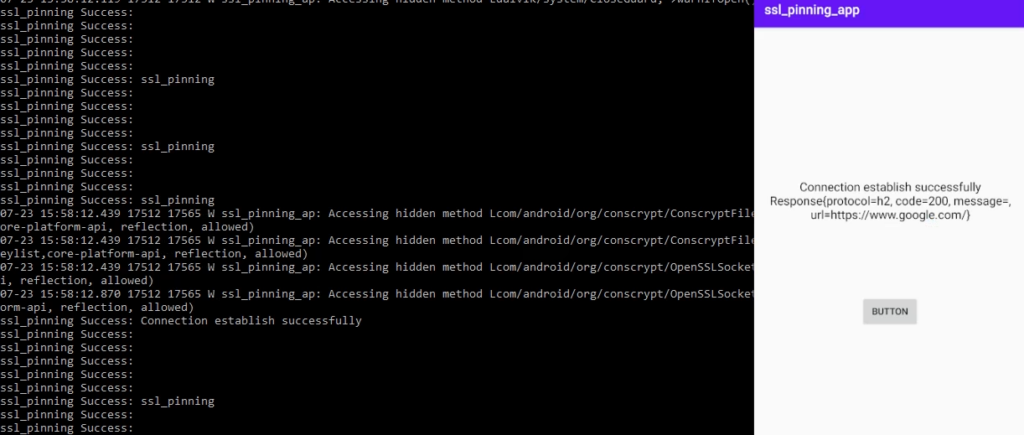
My historical screenshots showed HTTPS interception after the combined hooks. They do not establish that this smaller hook works against every current APK.
What counts as a successful result
I look for three matching observations: the relevant hook ran, the application completed the request, and Burp captured that request and response. I compare the hostname and timing across all three.
A hook message alone proves that my replacement ran. It does not prove that the request completed. A successful HTTP response in the application alone does not prove the proxy saw the traffic.
I also rerun without the hook. If the baseline no longer fails, the test conditions changed and the comparison needs to be repeated.
Tips and gotchas
| Problem | What I check first |
|---|---|
| Device not listed | ADB authorization, USB connectivity, and Frida server privileges. |
| Server cannot start | Device ABI, matching Frida core version, and server log. |
| Java class unavailable | Whether the process has loaded it and whether the name was obfuscated. |
| Overload not found | The actual method signatures in the packaged library. |
| TLS still fails | Trust anchors, hostname verification, and which networking stack sends the request. |
| UI changes but traffic does not | Whether I changed only a presentation method. |
Frida's Java bridge also has a version boundary worth knowing. From Frida 17, custom agents need to account for the separate runtime bridges. Scripts loaded through the Frida REPL and frida-trace retain convenient bridge support. I follow the JavaScript API documentation when moving a CLI experiment into a custom host program.
Trace a Windows application
My earlier Windows examples used Fermion as a graphical host for Frida scripts. The Fermion repository remains the reference for that historical setup. I can also attach directly with the Frida CLI.
For a selected registry call, I save the following as trace-registry.js:
const advapi = Process.findModuleByName('advapi32.dll');

if (advapi === null) {
    console.log('advapi32.dll is not loaded in this process');
} else {
    const address = advapi.getExportByName('RegOpenKeyExW');
    Interceptor.attach(address, {
        onEnter(args) {
            try {
                console.log('RegOpenKeyExW: ' + args[1].readUtf16String());
            } catch (error) {
                console.log('Cannot read subkey: ' + error);
            }
        }
    });
}
I choose the process in Task Manager, then attach from a shell with the actual process ID:
frida -p REPLACE_WITH_PID -l trace-registry.js
This traces one API in one process. It does not show every registry operation on the machine. If the module is not loaded when the script starts, I trigger the relevant action and reload the script.
For the Firefox experiment, the same limitation matters. Browsers use multiple processes, and a hook in the UI process may miss the network operation. Observing socket buffers also does not automatically reveal HTTPS plaintext. I need to identify the process, API, and encryption boundary before describing the data as network contents.
What I keep in the assessment notes
For each experiment, I save the script, application build, tool versions, baseline, and changed result. Those details make a hook reproducible and stop a UI trick from being mistaken for a transport bypass.
Pinning can make interception harder, but a client process under my control can be instrumented. I therefore keep authorization decisions and sensitive business rules on the server. On the client, I test trust settings, pin rotation, and failure handling as separate behaviors.
I finish by removing the test proxy configuration, stopping Frida server, and returning the device to its known lab state. The result I want is a precise explanation of one code path and the evidence that supports it.
Ask or Share Thoughts
Your message goes straight to me. Email is optional. The form records your IP address and browser information.