DNS Zone Transfers: Finding and Fixing Unrestricted AXFR
How I test DNS zone-transfer permissions, interpret the response, and restrict transfers without breaking secondary DNS servers.
Contents
Summary
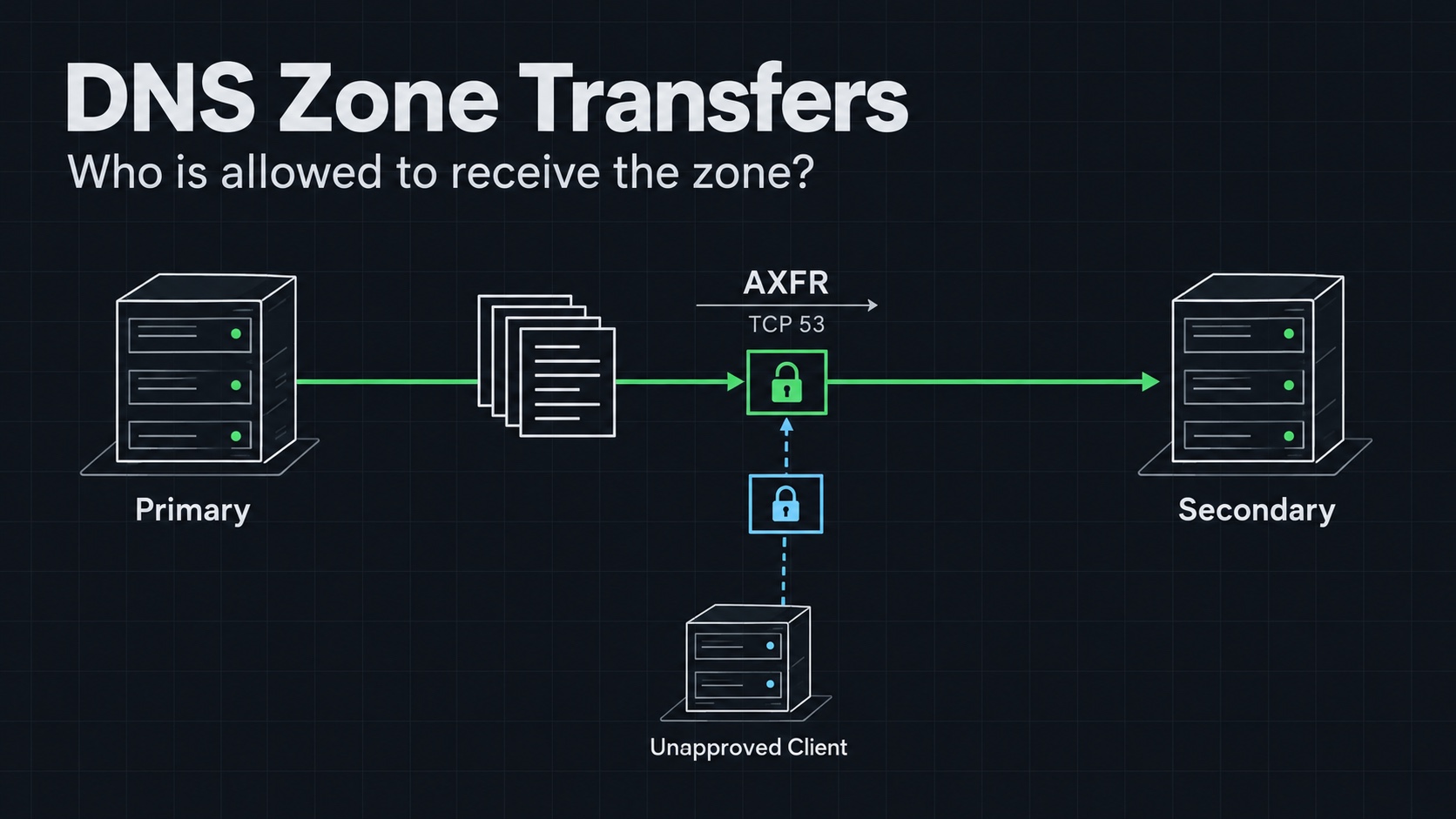
A DNS zone transfer lets one authoritative server copy zone data from another. It is part of normal DNS operations. The problem appears when a server sends that data to a requester that should not receive it.
I check zone-transfer permissions because a single successful request can reveal a useful inventory of hostnames and records. That can save an attacker reconnaissance work, especially when naming patterns expose administrative services or internal roles.
An unrestricted transfer is an information-disclosure finding. It does not, by itself, grant a shell, change DNS records, or provide access to the systems named in the response.
How it works
A primary server holds a zone, and authorized secondaries obtain updates so they can answer queries for it. AXFR requests a full transfer. The conventional AXFR exchange uses TCP, normally on port 53.
The returned data belongs to the requested zone. It is not a dump of every zone hosted by the server, and a delegated child zone may need separate handling.
I distinguish three operations:
| Operation | What it tells me |
|---|---|
| NS lookup | Which nameservers are published for a zone. |
| SOA lookup | The zone's start-of-authority record and related metadata. |
| AXFR request | Whether this server will transfer this zone to this requester. |
An NS answer from a recursive resolver does not prove that the resolver is authoritative. My original post made that inference from a response explicitly labelled non-authoritative. I now query the intended authoritative server directly and inspect the answer flags.
Conditions and affected versions
This is usually a transfer-permission error rather than a vulnerability limited to one DNS version. The relevant conditions are a reachable authoritative service, a hosted zone, and a transfer policy that accepts the requesting source or credentials.
Defaults vary across DNS products and releases. I review the effective configuration instead of assuming that every fresh install allows transfers.
For a lab reproduction, I need a zone I control, access to its authoritative server configuration, and a client with dig or Windows nslookup. I also need a known secondary or other approved transfer client for the positive control.
Reproduce in a lab
Authorized testing only
Only run this against systems you own or have written permission to test.
The examples use example.com and 192.168.1.100 as placeholders. I replace both with my isolated lab zone and authoritative server.
Discover and verify the nameserver
I first inspect the NS records through the lab resolver:
nslookup -type=ns example.com 192.168.1.100
Then I query the intended authoritative server directly:
dig @192.168.1.100 example.com SOA +norecurse
I look for an authoritative answer for that zone. An unexpected referral, missing SOA, or wrong server address needs resolving before the transfer test.
Request the transfer
From the client whose access I am evaluating:
dig @192.168.1.100 example.com AXFR
For a completed AXFR, I expect a transfer framed by the zone's SOA records. I keep the full response, not just a few interesting hostnames. The old article showed a shortened record list without enough framing to independently establish completion.
I also record the source address as seen by the server. NAT or a VPN can make it different from the client's local interface address.
Check from Windows
Windows nslookup can request a zone listing. The following starts the interactive client from a terminal:
nslookup
At its prompt, I enter:
server 192.168.1.100
ls -d example.com
exit
The ls operation is the relevant transfer request. Setting the query type to ANY is not a substitute for AXFR and is unnecessary for this sequence. Microsoft documents the operation in nslookup ls.
Interpret failures carefully
| Result | What I check next |
|---|---|
| Transfer refused | Whether this is the intended denial policy for this client. |
| TCP connection failure | Routing, firewall rules, service reachability, and the server address. |
| Zone not found or wrong authority | Whether I queried the server and zone I intended. |
| Records returned but no clear completion | The full transfer response and client errors. |
A blocked TCP connection can prevent a transfer test without proving that the DNS application's permissions are correct. I need the approved-secondary control to distinguish that case.
Impact
A zone can expose service naming conventions, mail infrastructure, host addresses, and other records that help build a target inventory. The severity depends on what is disclosed and whether that information was intended to be public.
I avoid calling every record sensitive. Many are already available through ordinary queries. The finding is stronger when I can explain how the transfer reveals additional data or makes discovery substantially easier.
Detection
I review transfer-related DNS logs for requests from sources outside the secondary-server inventory. I compare the queried zone, source, time, and whether the transfer completed.
Transfers to known secondaries are expected. I focus on an unexpected requester or a transfer policy that is broader than the operational need.
Fix and mitigation
For a BIND zone that does not need transfers, an explicit zone-level setting can deny them:
allow-transfer { none; };
This is a configuration fragment, not a complete named.conf. For zones with secondaries, I configure only the approved transfer clients and use authenticated transfers, such as TSIG, where appropriate. I follow the BIND configuration reference for the installed release.
On Windows DNS, I review the zone's transfer settings and restrict them to the intended secondary servers. I keep legitimate replication working while removing unrelated sources.
After changing the configuration, I repeat both tests: the unapproved client should fail, and the approved secondary should still obtain the zone. That pair of results is the evidence I want before closing the finding.
Ask or Share Thoughts
Your message goes straight to me. Email is optional. The form records your IP address and browser information.