Nuclei: Repeatable Security Checks with Templates
How I use Nuclei templates to run focused security checks, preserve evidence, and validate findings before reporting them.
Contents
What Nuclei helps me do
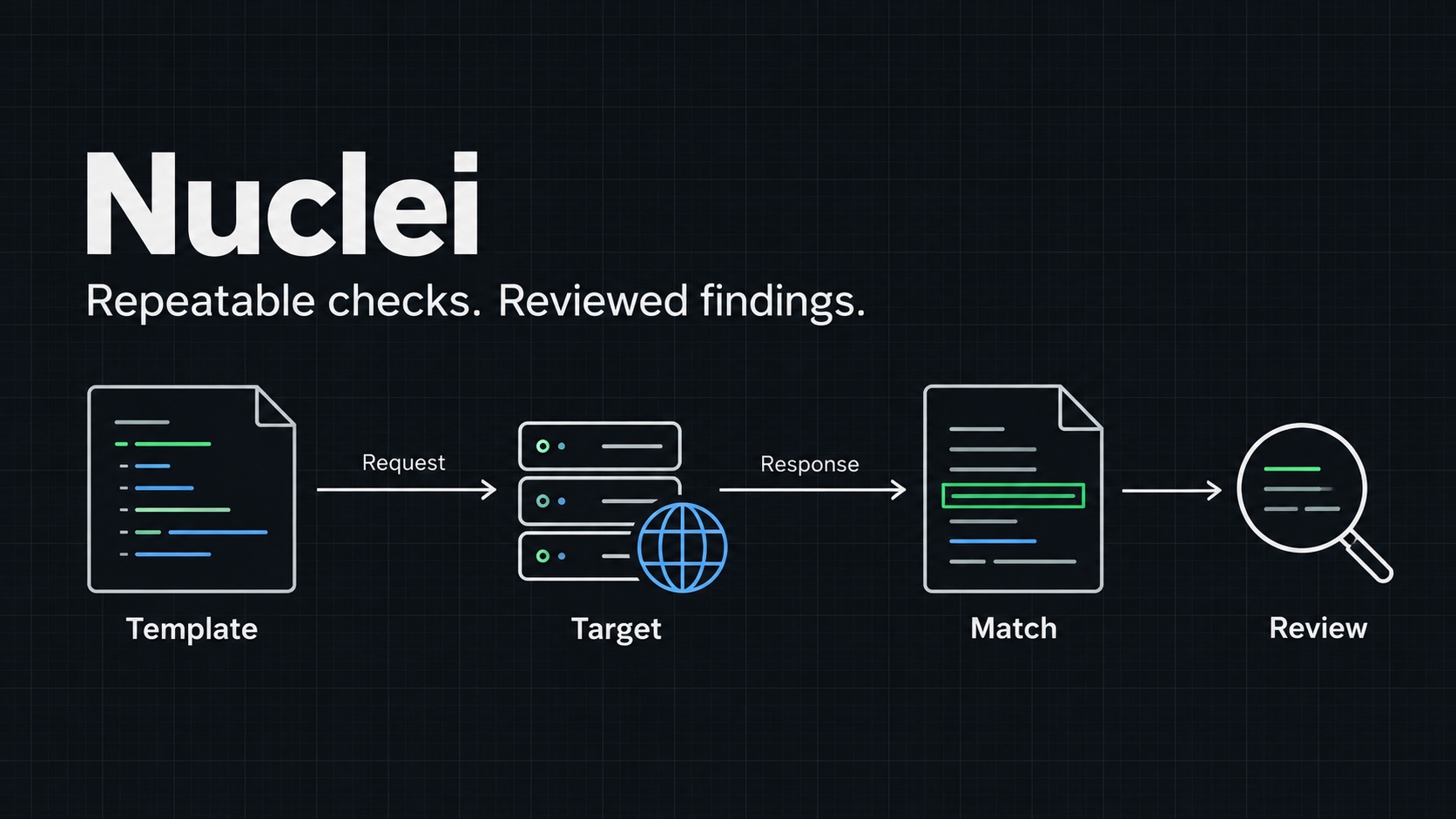
I use Nuclei when I want to repeat a specific security check across an approved set of targets. A template describes the requests to send and the conditions that count as a match. The engine handles the repetition.
That makes it useful for checking web applications, DNS, TLS, and other supported protocols. It also makes the template worth reading. A template name does not tell me everything about what a test sends or why it reports a finding.
My old post described Nuclei as producing zero false positives. That was too strong. A match is evidence to investigate. Its reliability depends on the template, the response, and the environment.
Authorized testing only
Only run this against systems you own or have written permission to test.
Install and record the setup
I use the installation method documented in the official Nuclei repository. On a machine with a compatible Go toolchain, the project provides this command:
go install -v github.com/projectdiscovery/nuclei/v3/cmd/nuclei@latest
The Go binary directory must be on PATH. I check the installed engine and update the templates separately:
nuclei -version
nuclei -update-templates
nuclei -h
I save both the engine version and the template revision with a scan. Updating one without recording the other makes later comparisons harder. For a repeatable assessment, I keep the reviewed template files alongside the evidence.
I also check the template path on disk. Older tutorials, including mine, used directories such as vulnerabilities/ssl-tls/. Template layouts change. I select a file that exists in my installed collection instead of copying a historical path.
Basic usage
For a focused HTTP check, I pass one reviewed template and one target. Here, reviewed-check.yaml is a local file I have already inspected, not a bundled template name:
nuclei -u https://app.example.com \
  -t ./reviewed-check.yaml \
  -rate-limit 5 \
  -o findings.txt
The example domain is a placeholder. I replace it with an approved target before running the command. The request limit is a starting point for a small assessment, not a universal safe rate.
For several targets, I put one approved URL per line in targets.txt:
nuclei -l targets.txt -t ./reviewed-check.yaml \
  -rate-limit 5 -o findings.txt
| Argument | Why I use it |
|---|---|
-u |
Checks a single target. |
-l |
Reads a target list from a file. |
-t |
Selects the template file or directory. |
-type dns |
Restricts execution to DNS templates. |
-type http |
Restricts execution to HTTP templates. |
-o |
Saves findings for review. |
Protocol filters narrow a selection. They do not make an unsuitable template work against a different protocol. I read the running guide when combining filters.
A small local example
Before using a custom template across an environment, I like to check its matching behavior against a controlled service.
I save the following as local-lab.yaml. It requests a text file and checks for an exact marker:
id: local-lab-marker

info:
  name: Local lab marker
  author: muzzy
  severity: info
  tags: lab,http

http:
  - method: GET
    path:
      - "{{BaseURL}}/marker.txt"
    matchers-condition: and
    matchers:
      - type: status
        status:
          - 200
      - type: word
        part: body
        words:
          - "nuclei-local-lab-marker"
In a new working directory, I start a local server:
mkdir nuclei-lab
printf 'nuclei-local-lab-marker\n' > nuclei-lab/marker.txt
python3 -m http.server 8000 --bind 127.0.0.1 --directory nuclei-lab
In another terminal, from the directory containing the template, I validate and run it:
nuclei -validate -t ./local-lab.yaml
nuclei -u http://127.0.0.1:8000 -t ./local-lab.yaml -o lab-findings.txt
cat lab-findings.txt
The intended match is the marker file. It demonstrates template matching, not a vulnerability. As a negative control, I change the marker content and repeat the check. A template that still matches needs investigation before I trust it.
What I review before reporting
I confirm the actual response, the template's matching conditions, and whether the behavior has security impact. A product fingerprint or version string alone may not establish exposure.
An empty findings file also needs context. The selected templates may not cover the application, authentication may be missing, or requests may have failed. I keep execution logs when I need to distinguish those cases.
I start with a small selection and watch the application's health. Broad template collections can produce very different traffic from a single check.
Detection and defence
For defenders, a coordinated scan offers a useful chance to compare application, proxy, and endpoint logs. I record the scanner address and test window, then confirm which requests were visible and which controls responded.
My stopping point is a reproducible observation with a reviewed request and response. That gives the application owner something concrete to fix and something equally concrete to retest.
Ask or Share Thoughts
Your message goes straight to me. Email is optional. The form records your IP address and browser information.