Smali Debug Cheatsheet
A practical cheatsheet for reading, editing, debugging, and rebuilding Android apps at the Smali level, including Frida Gadget injection and Logcat printing.
Contents
Debugging Smali is hard. I'd recommend a solid understanding of Java and Android app development before you start, because most of the time you're reading code that a compiler produced from something you already know.
What is Smali?
When a developer builds an Android app, the Java code is first compiled into .class files containing JVM bytecode. The dx tool then converts those into Dalvik bytecode and packs them into a single classes.dex file inside the APK.
Dalvik bytecode is binary, which makes it very hard for a human to read or change. That's where Smali comes in:
- smali is the assembler. It converts human-readable Smali code back into DEX bytecode.
- baksmali is the disassembler. It converts DEX bytecode into readable Smali code.
The names come from the Icelandic words for "assembler" and "disassembler." With these tools you can read, modify, and debug an Android app at the bytecode level.
Setting up the tools
Install the tools on Kali or Ubuntu:
sudo apt update && sudo apt install default-jre
sudo apt install adb apktool jadx
- apktool decodes an APK into resources, assets, the manifest, and Smali files. Installation guide: https://ibotpeaches.github.io/Apktool/install/
- jadx decompiles an APK or DEX into Java source. Releases: https://github.com/skylot/jadx/releases
Decode an APK with apktool, or decompile it to Java with jadx:
apktool d example.apk
jadx -d output example.apk
unzip example.apk
unzip gives you the raw contents, which is useful when you just need the classes.dex file.
Rebuild, sign, and install
After you edit the Smali, you need to rebuild, zipalign, sign, and install the app.
I'd use uber-apk-signer for signing because it handles the debug keystore for you:
wget https://github.com/patrickfav/uber-apk-signer/releases/download/v1.2.1/uber-apk-signer-1.2.1.jar -O uber_apk_signer.jar
java -jar uber_apk_signer.jar --apks example.apk
One command that rebuilds, signs, and installs the app:
apktool b apk_folder/ -o example.apk && echo "compiled!" && java -jar uber_apk_signer.jar --apks example.apk && adb install -r example-aligned-debugSigned.apk
The signer adds a suffix to the output file, so check the actual filename in your folder before running adb install.
If you prefer manual signing, the order matters: rebuild, then zipalign, then sign. Signing before zipalign breaks the signature.
apktool b <path-to-extracted-apk> -o unsigned.apk
zipalign -v 4 unsigned.apk aligned.apk
apksigner sign --ks <path-to-keystore> --out final.apk aligned.apk
jarsigner with SHA1withRSA still works for old APKs, but modern Android expects APK Signature Scheme v2 or later, which apksigner provides.
Injecting Frida Gadget
Frida Gadget is a small shared library you load into an app so Frida can instrument it at runtime. You load it by name with System.loadLibrary.
- Download the Android Gadget for your device's architecture from the Frida releases page. Most modern devices use
arm64-v8a. - Rename the file to
libfrida-gadget.soand place it in the matching ABI folder, for examplelib/arm64-v8a/. This folder lives inside the decoded APK after apktool runs. - Extract the APK and find the entry point. If the app declares a custom
Applicationclass inAndroidManifest.xml(android:name), open that Smali file. Otherwise, pick an early-running class such as the main Activity constructor. - Add the load call to the
onCreatemethod (or the constructor). Note thatSystem.loadLibrarytakes the library name without thelibprefix and the.soextension:
const-string v0, "frida-gadget"
invoke-static {v0}, Ljava/lang/System;->loadLibrary(Ljava/lang/String;)V
- Make sure
.localsis large enough to holdv0. If it says.locals 0, change it to.locals 1. - Rebuild, zipalign, and sign the APK as shown above, then install it.
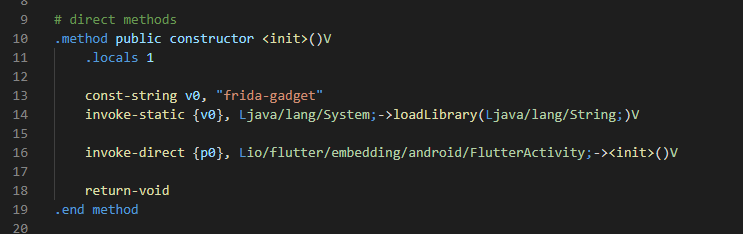
In this example, loadLibrary runs before the superclass constructor call. The call doesn't touch this, so the verifier accepts it. Keep the invoke-direct to FlutterActivity-><init>()V in place.
Troubleshooting
UnsatisfiedLinkErrorordlopen failed: the.sofile is missing, has the wrong name, or is in the wrong ABI folder.VerifyError:.localsis too small for the registers you use.- Install fails with
INSTALL_FAILED_UPDATE_INCOMPATIBLE: uninstall the original app first, because the signing key changed.
Printing messages to Logcat
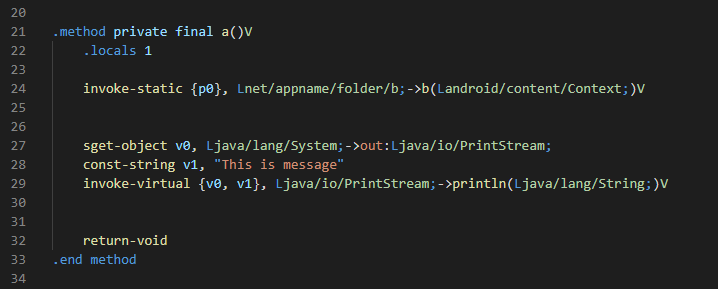
Smali doesn't have println. To see output while the app runs, you can use System.out or android.util.Log.
System.out writes to Logcat under the tag System.out:
sget-object v0, Ljava/lang/System;->out:Ljava/io/PrintStream;
const-string v1, "This is message"
invoke-virtual {v0, v1}, Ljava/io/PrintStream;->println(Ljava/lang/String;)V
For proper tagged logs, I prefer Log.d. It takes a tag and a message as two separate arguments:
const-string v0, "MyTag"
const-string v1, "App started functionality"
invoke-static {v0, v1}, Landroid/util/Log;->d(Ljava/lang/String;Ljava/lang/String;)I
To print the value of a static field, load it into a register and log it. Make sure .locals covers every register you use:
# Assume we want to print the value of the static field Lnet/appname/folder/b;->c
.locals 9
sget-object v7, Lnet/appname/folder/b;->c:Ljava/lang/String;
const-string v8, "Printing value"
invoke-static {v8, v7}, Landroid/util/Log;->d(Ljava/lang/String;Ljava/lang/String;)I
Then filter in Logcat:
adb logcat -s MyTag
Tip: Visual Studio Code with a Smali syntax extension makes editing much faster.
Smali syntax cheatsheet
Type descriptors
| Code | Meaning |
|---|---|
V |
void (return values only) |
Z |
boolean |
B |
byte |
S |
short |
C |
char |
I |
int |
J |
long |
F |
float |
D |
double |
Lpackage/ClassName; |
an object of that class |
[I |
an int array (prefix [ for any array type) |
Directives
| Directive | Purpose |
|---|---|
.class |
Starts a class definition |
.super |
Declares the superclass |
.field / .end field |
Declares a field |
.method / .end method |
Starts and ends a method |
.parameter |
Names a method parameter |
.line |
Sets the current source line number |
.locals |
Number of local registers in a method |
Instructions
| Instruction | Purpose |
|---|---|
invoke-direct, invoke-static, invoke-virtual, invoke-super, invoke-interface |
Calls a method. Range variants end in /range. |
move |
Copies a value between registers |
const / const-string |
Loads a constant into a register |
if-eq, if-ne, if-lt, if-ge, if-gt, if-le |
Conditional branch. The z suffix (for example if-eqz) compares against zero. |
goto |
Unconditional branch |
return-void / return |
Returns from a method |
new-instance |
Creates a new object |
new-array |
Creates an array |
sget-object / sput-object |
Reads or writes a static field |
aget-object |
Reads an array element |
Examples
Create an object and call its constructor:
new-instance v0, Ljava/lang/StringBuilder;
invoke-direct {v0}, Ljava/lang/StringBuilder;-><init>()V
Load a string constant:
const-string v0, "Hello World!"
Branch on a condition:
if-eqz v0, :label
# code here runs only when v0 is NOT zero
:label
# code here always runs after the branch
Create a String array of size v1:
new-array v0, v1, [Ljava/lang/String;
Read an element from that array:
aget-object v0, v1, v2
Java to Smali
Writing Smali by hand is slow, and learning it well takes time. You can speed things up by compiling Java and disassembling the result.
- Write a simple Java class:
public class MyClass {
    public static void main(String[] args) {
        System.out.println("Hello, world!");
    }
}
- Compile it with
javac:
javac MyClass.java
- Convert the
.classfile to DEX.dxstill works, but Android's build system now usesd8, which is the modern replacement:
dx --dex --output=classes.dex MyClass.class
- Disassemble the DEX into Smali. baksmali writes one
.smalifile per class into the output folder:
baksmali d classes.dex -o out
This produces out/MyClass.smali:
.class public LMyClass;
.super Ljava/lang/Object;
.source "MyClass.java"

.method public static main([Ljava/lang/String;)V
    .registers 2

    sget-object v0, Ljava/lang/System;->out:Ljava/io/PrintStream;
    const-string v1, "Hello, world!"
    invoke-virtual {v0, v1}, Ljava/io/PrintStream;->println(Ljava/lang/String;)V

    return-void
.end method
Final thoughts
Debugging Smali is one of the best ways to improve your static and dynamic analysis skills in penetration testing. Start with small edits, like printing a value, and build up from there.
Ask or Share Thoughts
Your message goes straight to me. Email is optional. The form records your IP address and browser information.